Coordination so simple, every volunteer can use it.
Big, clear screens. One-tap responses. No training required. AllDART puts people, assignments, and resources on one operating picture — and stays easy for every member of your roster, whatever their comfort with technology.
Coordinate your team with a couple of clicks.
ALLDART unifies emergency activation, drone, air & field operations, and FEMA-grade documentation in one platform — built for the teams that respond when it matters, with field tools that keep working when connectivity drops.
Seven problems every response has. Seven answers.
The paperwork fills itself
A response generates federal forms — ICS-211, 214, 209, 213RR, 206, 220. Somebody types them at midnight from a clipboard and memory, days after the facts have gone fuzzy. They're late, they disagree, and the person doing it is your best coordinator.
The forms populate themselves from the live data your team is already creating, rendered to the real federal layout and ready to export or print. Your coordinator reviews and signs — they don't retype.
Reimbursement is computed, not tallied
Volunteer hours are worth real money against a FEMA cost-share, and most organizations never claim them — claiming means reconstructing hours from sign-in sheets, hand-tallying mileage, and finding the right state form. So the money goes unrecovered.
Hours × the volunteer rate → the FEMA Public Assistance offset, calculated per activation with a one-tap export. Claims group onto the correct state form with subtotals; mileage sums itself from check-out. The case builds itself while the response happens.
It keeps working when the towers don't
The disaster that activates your team takes down the cell network too. Every coordination tool — group text, phone tree, app — stops exactly when you need it. "Offline mode" usually means your phone remembers what you typed. It doesn't mean your team can still talk.
Three layers, in order: every phone works offline and catches up on reconnect; with no internet, alerts, calls, and chat relay phone-to-phone over mesh radio — no tower in between; and a licensed operator sends ICS forms out over ham radio email. All real, all running today.
Coordination across organizations, not just inside yours
For emergency managers & VOADsA real disaster is never one organization. It's a dozen, each with its own roster and its own picture, connected by a conference call and a spreadsheet nobody trusts. Two groups cover the same neighborhood while another goes unserved, and nobody can produce a total.
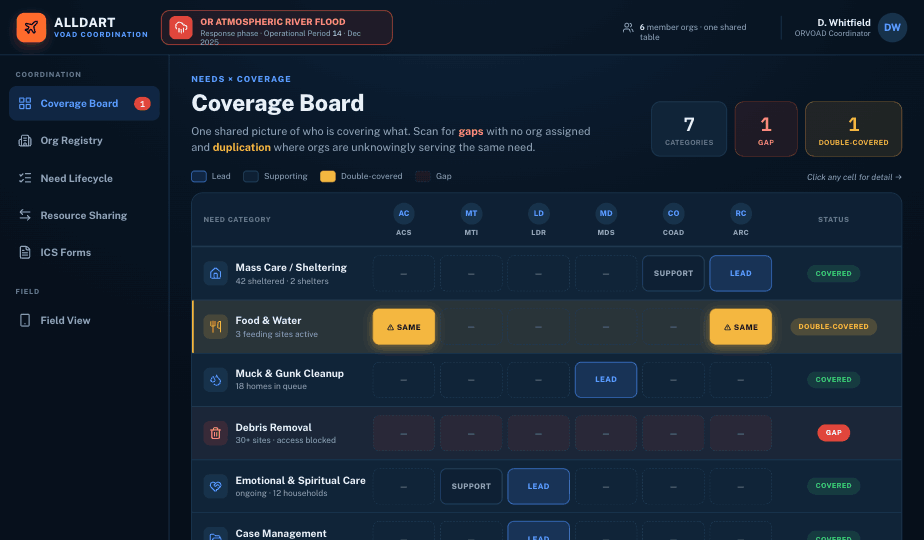
A live coverage grid flags gaps and double-coverage. Duplicate needs are caught before the second one is logged; county-based routing suggests the right partner. A statewide roster and reimbursement total assemble from every partner's activity — with nothing crossing an organizational line until both sides agree to share.
See the coordinator console ↓A drill can never contaminate a real activation
Exercising means sending things that look exactly like the real thing. One drill message mistaken for a live call — or one exercise record in a real total — and you've scrambled people for nothing or filed fiction. Most teams manage this with a shouted "THIS IS A DRILL" and hope.
Every message and record is Real, Exercise, or Test — structurally, not by convention. Exercise data separates automatically, and a drill can never override a live activation. Train as hard as you like. Nothing leaks.
Credentials renew on time, on their own
Certifications expire quietly, and the spreadsheet tracking them is only as current as the last person who opened it — so you learn a card lapsed when someone's standing at staging and can't deploy.
A daily check flags every credential nearing expiry and notifies the member and the admin before it lapses. Finish a class and the certificate grants itself to every attendee. Nobody watches renewal dates.
The people who just show up
In a real disaster, strangers arrive wanting to help. Not on your roster, not vetted — your biggest surge capacity and your biggest liability, handled with a clipboard that makes your accountability count wrong.
Walk-ups register as emergency workers on the spot — offline, in under a minute, classified against the state's own categories — and fold into the same roster, headcount, and reimbursement rollup as everyone else. In the count from the moment they arrive.
There's one more — the field boards, in the field — and it runs deeper than a front page.
Activate your whole team in seconds.
One Call reaches every phone. Every member answers with one tap — On my way, Will standby, Unavailable — and command watches the response tally live instead of working a phone tree.
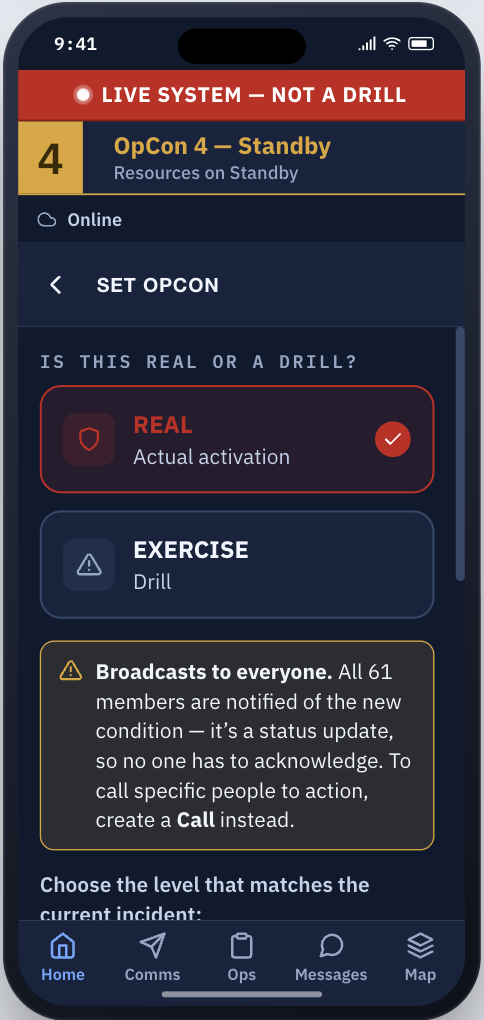
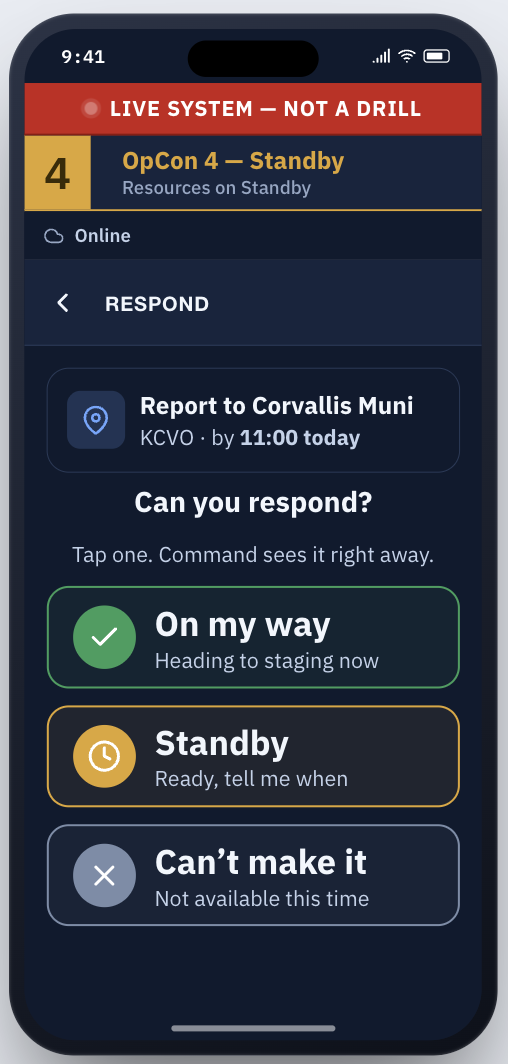
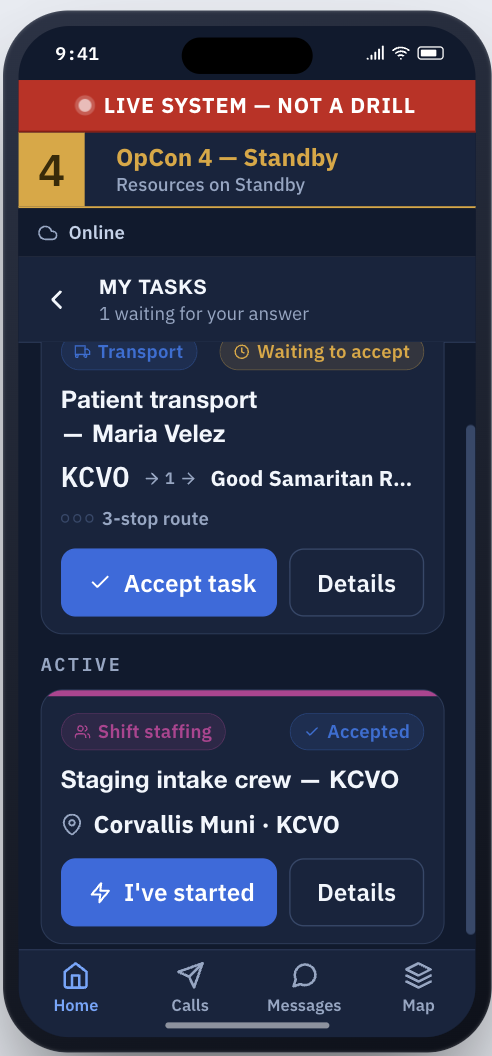
One operating picture, from activation to after-action
The command console gives incident command the whole picture — while every responder carries activation, tasking, response, and field reporting in their pocket.
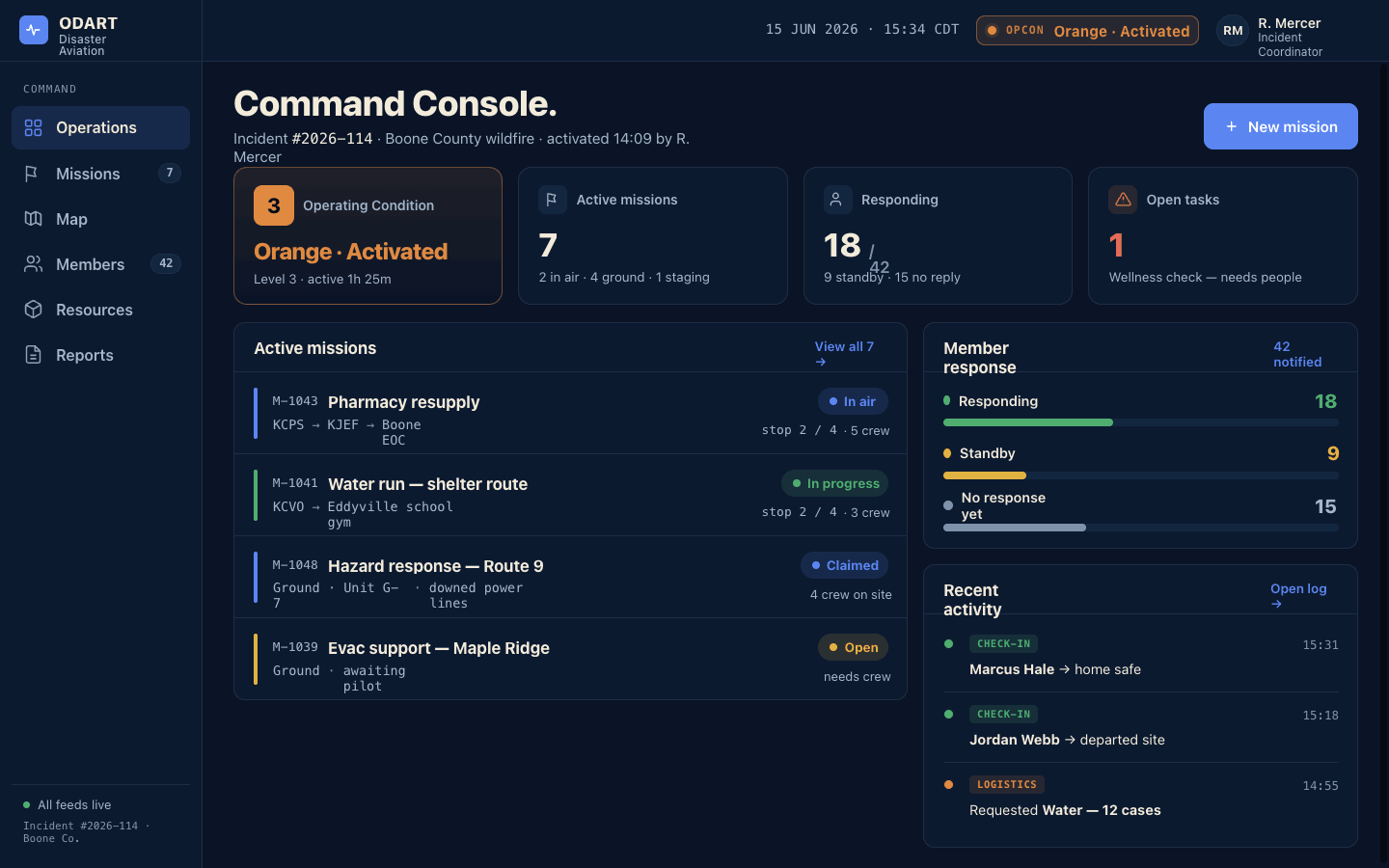
Fully functional on desktop and mobile. Every capability runs in the browser console and in the native iOS & Android apps — same data, same controls, online or off. Nothing is view-only on a phone.
Everything an activation demands.
Every tier includes all of it.
Alert & activate
OpCon readiness levels
Set by command, seen by everyone instantly — with REAL vs EXERCISE mode built in.
Calls & Broadcasts
Activation alerts with one-tap responses — On my way, Standby, or Unavailable — plus plain announcements, targeted by region, team, or role.
Live reach count
See exactly how many people your alert will reach — by region, team, or role — before you send.
IPAWS alert intake
Watch state FEMA/IPAWS alerts sorted by severity; promote one into a Call or Broadcast with the source attached.
Account for everyone
One-tap check-in
Check in, check out, and a self-confirmed "home safe" step. On-site status expires on its own, so the count is always current.
Live roster board
Not checked in · On site · Departed & home safe — leaders can check others in, marked "Checked in by [name]".
Walk-in volunteer registration
Register a walk-up volunteer from the board in seconds — works offline. Full temporary-worker registration with signed acknowledgments and worker classes, too.
Reachability, before you alert
"X of Y reachable" — phone vs. web, active vs. stale, who carries a radio — plus a low-key "Can we reach you?" ping.
Operate in the field
Field observations
Hazard, damage, SAR, and infrastructure reports with severity, photos, and GPS — offline.
Live operational map
People, observations, and missions over weather, TFRs, wildfire, and earthquake layers.
Need-to-know location
Sharing is off by default, auto-expires in minutes, and is deleted within the hour — no background tracking.
SAR, triage & damage boards
Search sectors, START triage, and drive-by damage surveys — each fully offline.
Aviation & missions
Register aircraft, track pilot currency, and assign flights — Draft → Planned → Active → Complete — with mission reports feeding the ICS-220.
Drone operations
Drone sorties run as missions with the same tasking, and aerial photos land on the live map as geotagged observations.
Paperwork, handled
ICS / FEMA forms
211, 214, 206, 209, 213RR, and 220 — filled from live data, export-ready. No retyping.
Reimbursement, calculated
Expense claims grouped onto Washington EMD forms with subtotals — hours and mileage totaled from check-out.
Expense claims & mileage
Anyone logs their own claim with a receipt photo — Submitted → Approved → Paid — and mileage is captured at check-out.
Custom report builder
Start blank or copy an official form; choose, reorder, and rename columns.
Run the team
Roles & permissions
A 21-permission editor with your own role labels, approvals, and send-scope guardrails.
CSV import & export
Load a whole roster at once with duplicate-skip; export it back in one click.
Credentials & training
Expiries flagged automatically; completing a class grants the credential to every attendee.
Dispatch & task board
Tasks move Open → Assigned → Accepted → In progress → Done, assigned to people in range.
Connected anywhere
Messaging
Direct or chain-of-command, queued when signal drops, sent the instant it returns.
Push & SMS delivery
Push notifications with acknowledgment tracking. SMS delivery available, billed per message.
Offline-first, syncs later
Check-ins, calls, observations, and messages all work with no signal — an Outbox sends everything the moment you reconnect.
Mesh radio relay
Alerts and chat relay device-to-device over mesh radio with no cloud at all — with hop counts and a public fallback channel.
The network goes down. The response doesn't.
A copy of the team's information lives on every phone. Check-ins, Calls, observations, messages, and walk-in registration all keep working with no signal — nothing has to be re-entered, and nothing is lost.
Everyone keeps working. Check in and out, mark home safe, send and answer Calls, file observations, add walk-in volunteers, write messages.
Every action waits safely on the phone, visibly queued — "Queued — sends when back online" — with a short window to undo.
Internet, Wi-Fi, or mesh radio — the app syncs automatically in both directions. Photos upload, records reconcile, the roster is current again.
A state alert lands. Your team hears it in one tap.
Command watches official FEMA IPAWS alerts for your state, sorted most-severe first. "Use in a Call" or "Promote to Broadcast" fills in the message with the alert text and "Source: FEMA IPAWS" — nothing sends until you choose the recipients.
FEMA, ICS, and IPAWS are referenced for compatibility; ALLDART is not affiliated with or endorsed by FEMA.
Pick the states to watch; matching alerts arrive sorted by severity, newest first. Test and exercise alerts are labeled.
One tap turns an alert into a team Call or Broadcast, source attached — targeted by region, team, or role like any other message.
Responses tally live, so command knows who has seen the warning — and who still needs a follow-up.
Six organizations show up. Only one of them can see the whole board.
Mutual aid fails quietly — a need nobody claims, two organizations covering the same gap while a real one goes unfilled, a partner who never learns the need was closed. ALLDART gives the coordinator a live coverage board and gives every member organization a shared, honest picture.
Coverage Board
Need categories down the side, member organizations across the top — every cell reads Lead, Supporting, or open, and every row flags a gap or a double-covered risk instantly.
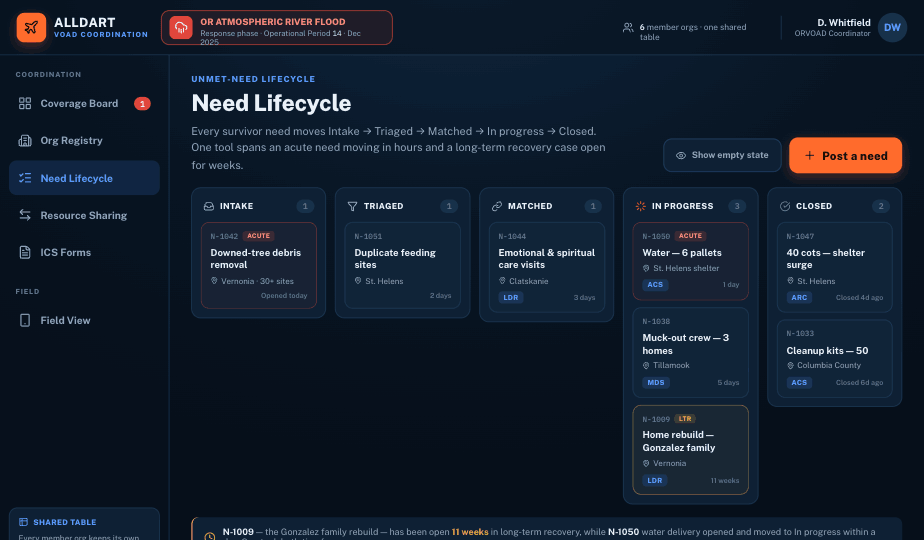
Need Lifecycle, five stages
Intake → Triaged → Matched → In progress → Closed. Post a need once; the coalition sees it move without a single follow-up call.
Resource Sharing
Organizations post a surplus or a gap and the app suggests matches — a transfer moves through requested to delivered with nothing lost in translation.
Organization Registry
Every member organization's capabilities, capacity, and service area in one directory — route a need to the right partner in seconds, not a phone tree.
Statewide reimbursement & worker roster
Claims from every member organization totaled by EMD form and by org; every registered emergency worker, statewide, in one roster.
ICS forms across the coalition
ICS-213RR, 209, and 214 fill in from live coalition data — ready to review and export for the whole activation, not just one organization.
An activation is no place for a group text.
Most teams run a response on a patchwork of group texts, spreadsheets, and paper ICS forms. ALLDART replaces the patchwork with one system of record — simple enough for CERT and spontaneous volunteers, structured enough for VOAD mutual aid, so coordination, operations, and documentation finally live in the same place.
- ✕Group texts no one can audit when it counts
- ✕Spreadsheets that are stale within the hour
- ✕Paper ICS forms re-keyed days after the fact
- ✕No reliable count of who's actually reachable
- ✕Volunteer hours reconstructed from memory at reporting time
- ✕A drill and a real response mixed into the same records
- ✕Everything stalls the moment the network drops
- ✓Every message logged and audit-ready — who, what, and which audience
- ✓A live response dashboard that's current to the second
- ✓ICS forms generated as you work, export-ready
- ✓Reachability and one-tap check-in accountability at a glance
- ✓Hours captured automatically — ready for reimbursement, no timesheets
- ✓EXERCISE mode keeps drills separate — and can never override a live activation
- ✓Comprehensive field tools that keep working when the signal drops, then sync when it returns
Every tier includes the complete core platform
No feature gating — pricing is by roster size only.
- ✓Activation calls with live response counts
- ✓Broadcasts & targeted alerts by region, team, or role
- ✓Check-in, roster accountability & home-safe tracking
- ✓Walk-in volunteer registration
- ✓Roles, permissions & CSV roster import
- ✓Direct & chain-of-command messaging
- ✓Field observations with photos & GPS
- ✓Live operational map
- ✓ICS / FEMA forms filled from live data
- ✓State EMD reimbursement, calculated
- ✓Volunteer hours, mileage & cost-share totals
- ✓Credentials with expiration reminders
- ✓Training classes that grant credentials
- ✓Search & rescue, START triage & damage assessment boards
- ✓Task dispatch
- ✓Offline operation & mesh radio
- ✓iPhone, Android & web apps
- ✓Share resources and missions with other orgs
- ✓Group and Multi Team Messaging
Free 90-day pilot: run one full exercise on ALLDART before you commit. Every feature on, your real roster, no credit card.
Add-on — Aviation & Air Ops
Aircraft registry, pilots and currency tracking, flight creation and stages, weight & balance, and ICS-220 air operations. Included in Pro.
Add-on — Logistics & Cargo
Resource requests, on-hand inventory, receiving, load building, and full chain-of-custody tracking. Included in Pro.
Add-on — Drone / sUAS Ops
Drone registry, Part 107 pilot tracking, drone missions, and imagery feeding observations and damage surveys. Included in Pro.
VOAD, COAD & Emergency Managers
For VOAD coalitions, county emergency management, and state coordinators. The coordinator console: coverage board, need routing, coalition broadcasts, cost-share reporting, and the statewide worker roster. Member organizations subscribe separately.
Pricing questions
What counts as a member?
Active roster members with logins. Walk-up temporary emergency workers registered during an activation don't count against your member limit.
What does the 90-day pilot include?
Everything. Full platform, every feature and add-on on, your real roster, and support getting set up. If it doesn't earn its place in your operation, walk away — your data exports to CSV.
We're a government agency. Can we procure this?
Yes — Moon Mission Labs is a registered Washington state vendor (WEBS). Contact us and we'll work with your procurement process.
Does ALLDART integrate with TAK / ATAK?
A TAK integration is on our roadmap — a Cursor-on-Target feed that puts ALLDART field observations, member positions, and mission areas onto the TAK screens your partners already use. It is not built yet. If TAK interoperability matters to your team, contact us — roadmap priority follows real demand.